

This article applies to the following countries
- All countries
Import users from external system
This feature allows organisations and administrators to handle the import of new users in a secure and effortless way.- Manual Data Entry: Eliminates the need for admins to manually create/handle user data (email, first name, last name etc) in Findity.
- Data Integrity: Reduces human error and ensures that the user list in Findity perfectly matches the “source of truth” in the HR/Salary system.
- Onboarding Speed: Accelerates the setup time, and enable organisations to populate the platform with users within seconds.
- Reduction in “App-Hopping”: Centralizes user management so admins don’t have to switch between their HRIS and Findity to keep the user lists current, and updated.
How does it work?
- Select Provider: Admin goes to the Add Users dashboard and selects “Import from external system”
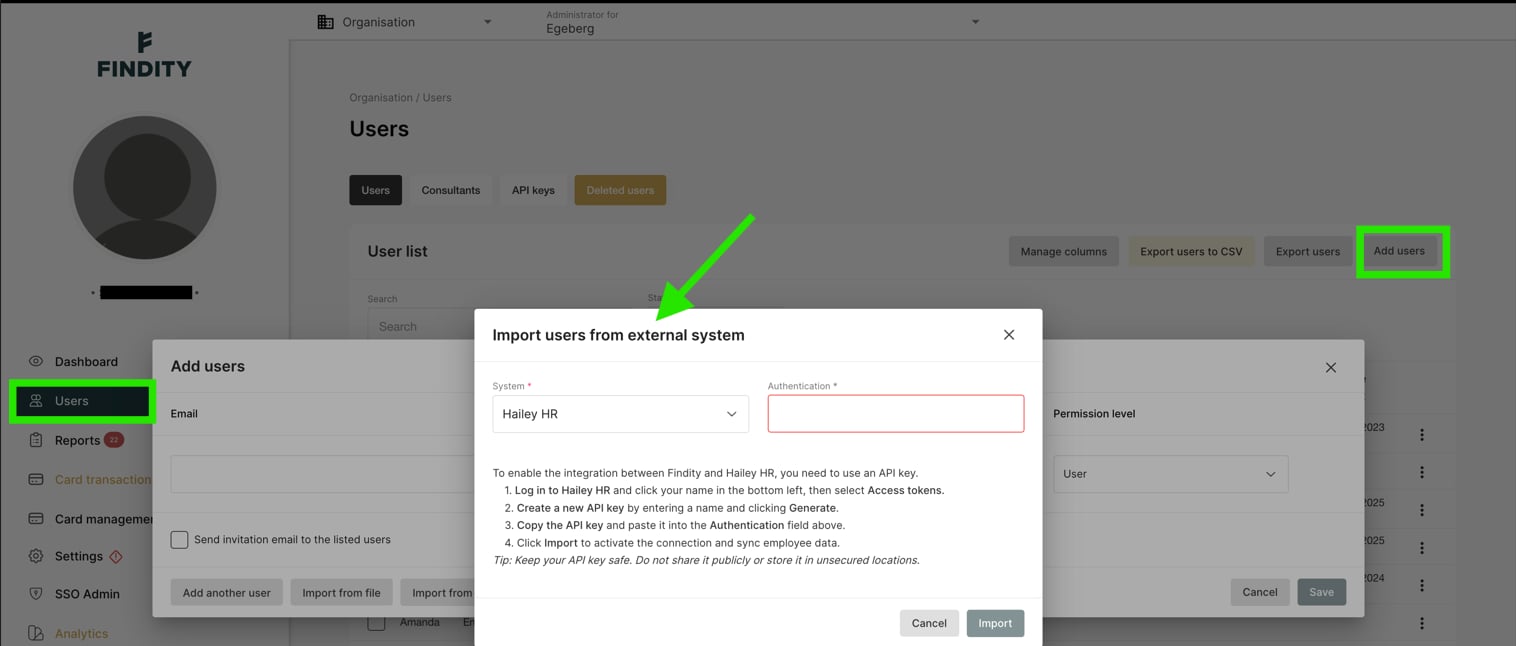
- Input Credentials: The admin generates an API key in their HR/Salary system and pastes it into the dedicated authentication field in Findity.
- Map & Preview: Findity fetches a preview of the users; the admin confirms the field mappings (e.g., ensuring “Email matches ”Email”)
- Finalize: Admin clicks “Import” to bulk-create/update the user accounts in Findity.