

This article applies to the following countries
- Sweden
Before you start
- You are an administrator in Findity.
- Your company has an agreement with Företagarna for company cards (credit, debit, or both).
- You have the information needed for onboarding at hand (company registration number, authorized signatory, and card details).
Findity does not charge for the integration itself. Card and service fees are billed by Företagarna according to your agreement with them.
How it works
Företagarna company cards is a card integration that delivers transactions in real time. When an employee makes a purchase, the transaction is sent straight to their expense app, ready to be matched with a receipt and submitted on a report. The integration supports both Företagarna – Kreditkort (credit cards) and Företagarna – Bankkort (debit cards), and covers the full transaction lifecycle: authorization, clearing, and invoicing.Activate Företagarna company cards
1
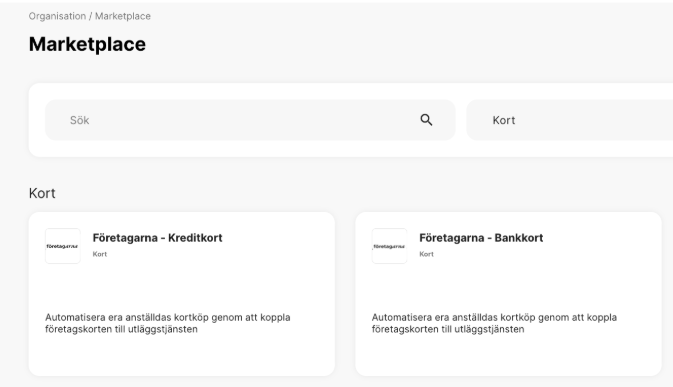
Open the Marketplace and pick the card product
- Go to Organization in the left-hand menu.
- Select Marketplace.
- Filter by the Cards category or search for Företagarna.
- Select Företagarna – Kreditkort or Företagarna – Bankkort depending on which card type you need to connect.
2
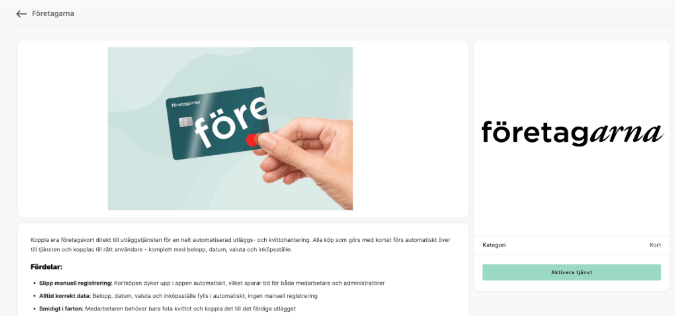
Activate the service
- On the product page, review the benefits and the information required.
- Click Aktivera tjänsten (Activate service).
3
Complete the onboarding form
Fill in the company details and the cards you want to connect. Once the form is submitted, the digital onboarding with Företagarna begins.
4
Wait for confirmation
Once onboarding is complete, the integration goes live and transactions start flowing in real time. Cardholders see new purchases directly in their expense app.
Good to know
- Real time. Transactions are delivered the moment the purchase is made, without waiting for a nightly batch.
- Full lifecycle. Status updates follow authorization, clearing, and invoicing, so you see the complete life cycle of every purchase.
- Multiple cards per user. A user can have several Företagarna cards linked to their account.
- Credit and debit. You can connect credit cards, debit cards, or both. Each card type is activated separately in the Marketplace.
Frequently asked questions
Are both credit and debit cards supported?
Are both credit and debit cards supported?
Yes. Företagarna company cards supports both Företagarna – Kreditkort (credit cards) and Företagarna – Bankkort (debit cards). Each card type is activated as its own product in the Marketplace.
How quickly does a purchase appear in the app?
How quickly does a purchase appear in the app?
Transactions are delivered in real time as soon as the purchase is made. Status is then updated as the purchase moves through authorization, clearing, and invoicing.
Can a user have more than one Företagarna card?
Can a user have more than one Företagarna card?
Yes. Several cards can be linked to the same user.
What does the integration cost?
What does the integration cost?
Findity does not charge for the integration itself. Card and service fees are governed by your agreement with Företagarna.
Do cardholders need to do anything themselves?
Do cardholders need to do anything themselves?
Yes. Cardholders complete a short digital onboarding to link their card to the expense service. After that, everything is handled automatically.