> ## Documentation Index
> Fetch the complete documentation index at: https://help.findity.com/llms.txt
> Use this file to discover all available pages before exploring further.
# Ongoing report tab in the Admin view
**This article applies to the following countries**
* All countries
### Feature description:
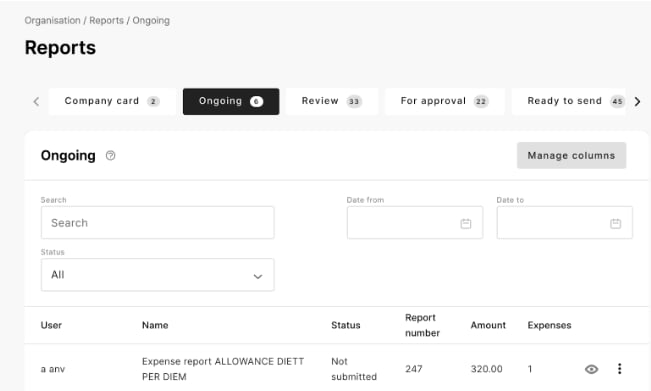
In this view Admins can view reports that are **currently in progress** by the user (not yet submitted) Reports currently on hold will also be avaliable in this view.
This allows Admins to get a **better understanding** of the current state of reports in on hold status. Possible error messages might be adressed and corrected.
Admins can also get a view over the reports that **soon** are going to be sent from the users.
### How to activate the Ongoing tab:
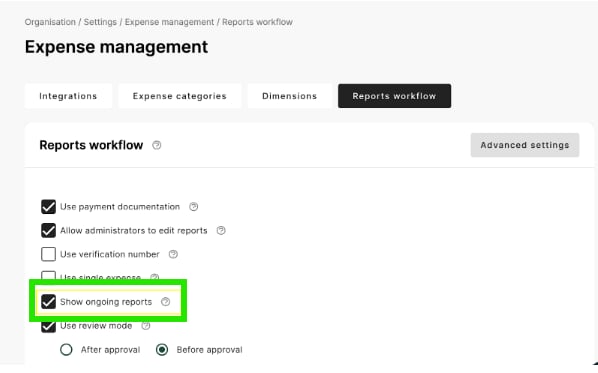
* Go to Organisation -→ Settings -→ Expense management -→ Reports workflow.
 * Go to Reports/Ongoing and Manage columns and add “status”
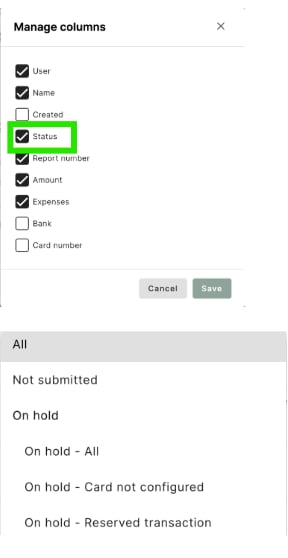 * Now you are able to see expenses and reports in the new view with the status, “Not submitted” and “Onhold”
## Related articles
* [How do I manage reports under the tab Ready to Send?](/en/expense-and-reports-administrator/how-do-i-manage-reports-under-the-tab-ready-to-send)
* [Can I, as an administrator delete an expense in a submitted report?](/en/expense-and-reports-administrator/can-i-as-an-administrator-delete-an-expense-in-a-submitted-report)
* [How can I see which approver has the report for approval?](/en/expense-and-reports-administrator/how-can-i-see-which-approver-has-the-report-for-approval)
* Now you are able to see expenses and reports in the new view with the status, “Not submitted” and “Onhold”
## Related articles
* [How do I manage reports under the tab Ready to Send?](/en/expense-and-reports-administrator/how-do-i-manage-reports-under-the-tab-ready-to-send)
* [Can I, as an administrator delete an expense in a submitted report?](/en/expense-and-reports-administrator/can-i-as-an-administrator-delete-an-expense-in-a-submitted-report)
* [How can I see which approver has the report for approval?](/en/expense-and-reports-administrator/how-can-i-see-which-approver-has-the-report-for-approval)