> ## Documentation Index
> Fetch the complete documentation index at: https://help.findity.com/llms.txt
> Use this file to discover all available pages before exploring further.
# Import users from External system
**This article applies to the following countries**
* All countries
### Import users from external system
This feature allows organisations and administrators to handle the import of new users in a secure and effortless way.
* **Manual Data Entry**: Eliminates the need for admins to manually create/handle user data (email, first name, last name etc) in Findity.
* **Data Integrity**: Reduces human error and ensures that the user list in Findity perfectly matches the “source of truth” in the HR/Salary system.
* **Onboarding Speed**: Accelerates the setup time, and enable organisations to populate the platform with users within seconds.
* **Reduction in “App-Hopping”**: Centralizes user management so admins don't have to switch between their HRIS and Findity to keep the user lists current, and updated.
### How does it work?
* **Select Provider**: Admin goes to the Add Users dashboard and selects “Import from external system”
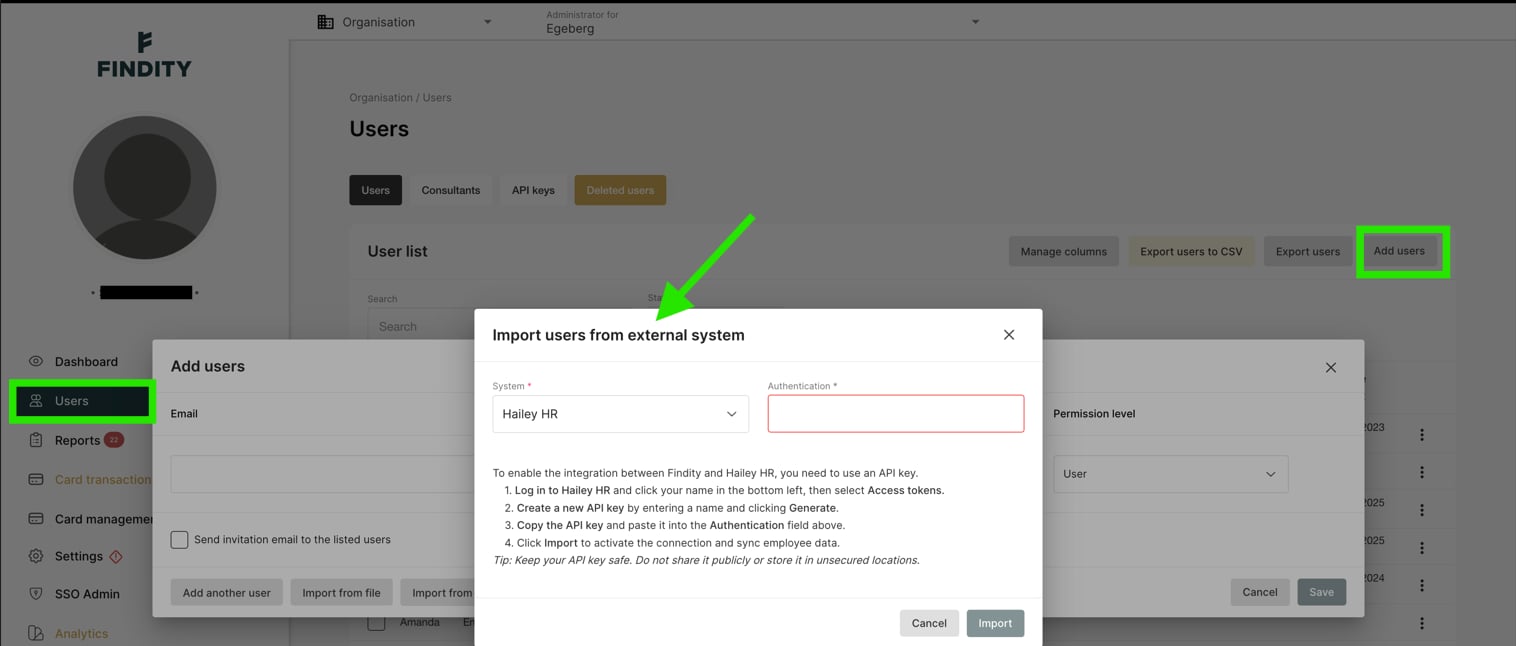 * **Input Credentials**: The admin generates an API key in their HR/Salary system and pastes it into the dedicated authentication field in Findity.
* **Map & Preview**: Findity fetches a preview of the users; the admin confirms the field mappings (e.g., ensuring “Email matches ”Email")
* **Finalize**: Admin clicks “Import” to bulk-create/update the user accounts in Findity.
## Related articles
* [Import dimensions on users](/en/settings-administrator/import-dimensions-on-users)
* [Are the users invited immediately when I add them?](/en/other/are-the-users-invited-immediately-when-i-add-them)
* [How do I manage users?](/en/settings-administrator/how-do-i-manage-users)
* **Input Credentials**: The admin generates an API key in their HR/Salary system and pastes it into the dedicated authentication field in Findity.
* **Map & Preview**: Findity fetches a preview of the users; the admin confirms the field mappings (e.g., ensuring “Email matches ”Email")
* **Finalize**: Admin clicks “Import” to bulk-create/update the user accounts in Findity.
## Related articles
* [Import dimensions on users](/en/settings-administrator/import-dimensions-on-users)
* [Are the users invited immediately when I add them?](/en/other/are-the-users-invited-immediately-when-i-add-them)
* [How do I manage users?](/en/settings-administrator/how-do-i-manage-users)