> ## Documentation Index
> Fetch the complete documentation index at: https://help.findity.com/llms.txt
> Use this file to discover all available pages before exploring further.
# Can I adjust the currency to be higher or lower when the user submits the report?
**This applies to the following countries**
* All countries
### Exchange rate adjustments (%)
We collect the currencies from [https://openexchangerates.org/](https://openexchangerates.org/) and we take the currency for the day the purchase is made. If you want the rate to always be a certain percentage higher or lower, there is a setting you can add:
Go to the tab *Settings - Expense management - Report flow - Advanced settings - Exchange rate adjustment (%).*
This setting means that the percentage you add is automatically added or removed when the user creates an expense with another currency.
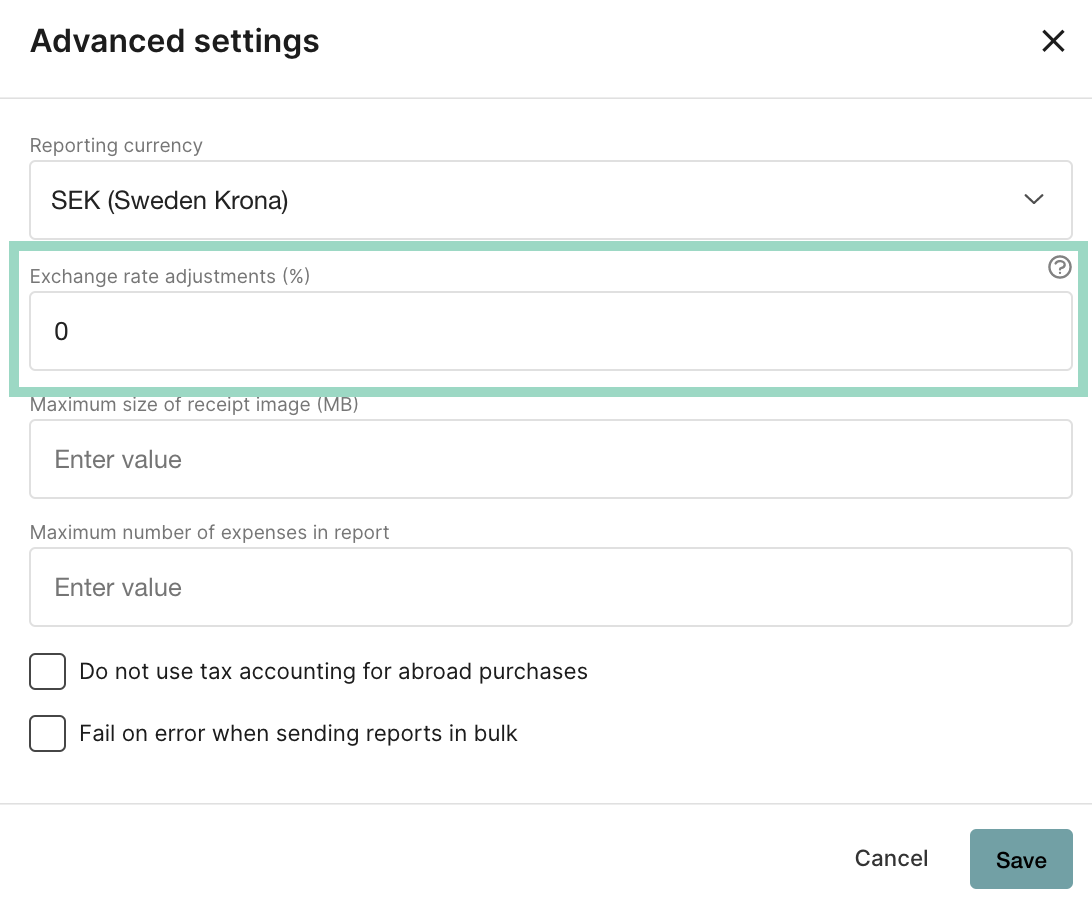 For example, if you have added -5 as the currency adjustment, then 5% will always be deducted from the exchange rate when the user creates an expense with a currency other than the accounting currency.
## Related articles
* [How can I as an administrator change the currency or the exchange rate in a submitted report?](/en/expense-and-reports-administrator/how-can-i-as-an-administrator-change-the-currency-or-the-exchange-rate-in-a-submitted-report)
For example, if you have added -5 as the currency adjustment, then 5% will always be deducted from the exchange rate when the user creates an expense with a currency other than the accounting currency.
## Related articles
* [How can I as an administrator change the currency or the exchange rate in a submitted report?](/en/expense-and-reports-administrator/how-can-i-as-an-administrator-change-the-currency-or-the-exchange-rate-in-a-submitted-report)