> ## Documentation Index
> Fetch the complete documentation index at: https://help.findity.com/llms.txt
> Use this file to discover all available pages before exploring further.
# MCP Server for API Documentation
**This applies to the following countries**
* All countries
### Overview
We are proud to introduce our **Model Context Protocol (MCP) Server**. This new functionality allows developers to bridge the gap between our API documentation and AI-assisted development tools like **Claude, ChatGPT, Cursor, and GitHub Copilot.**
Instead of manually searching through documentation pages, you can now connect your AI assistant directly to our live documentation to get instant, contextual answers and accurate code snippets.
### Why use the MCP?
The traditional "read-and-research" method of integration is evolving. By using our MCP server, you benefit from:
* **Zero-Search Integration:** Ask questions in natural language (e.g., *"How do I sync tax rates?"*) and get immediate answers.
* **Contextual Code Generation:** Receive code examples that are tailored to your specific query and reflect the latest API schema.
* **Eliminated Learning Curves:** New team members can start building immediately without mastering our entire documentation structure first.
* **Real-Time Accuracy:** The AI references the live documentation, ensuring you never build against deprecated endpoints.
* **Reduced Context Swithching:** Stay in you IDE or AI assistant without jumping between docs, browser tabs, and code - keeping you in flow and shipping faster.
### How it works
The MCP is an open standard that enables AI models to access external data sources securely. By hosting an MCP server, we provide a “translator” between our technical documentation and your LLM-bases tools.
For a partner developer looking to accelerate their workflow, the experience looks like this:
* **Configuration:** In your AI tool of choice (e.g., Claude Desktop, Cursor, ChatGPT), add the MCP server URL to your configuration.
* **Indexing:** The AI tool connects to the server and indexes the available documentation automatically.
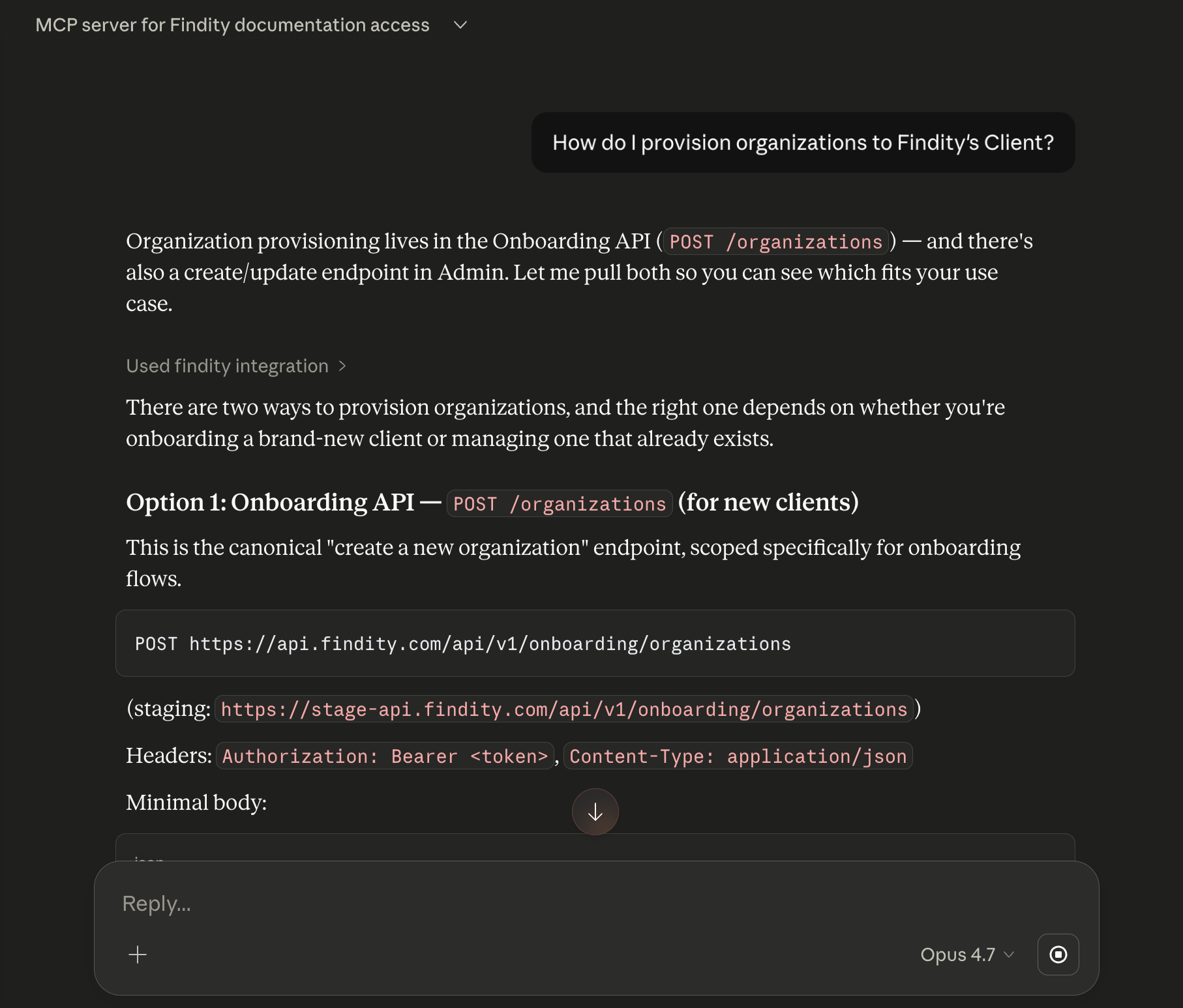
* **Querying:** You ask questions in natural language — for example, *“How do I provision company data; dimensions and users?”*
* **Guided Response:** The AI responds with answers, code samples, and guidance grounded in the current documentation, including references back to the relevant doc pages.
* **Conversational Iteration:** You refine the integration, ask follow-up questions, and generate code—all without leaving your development environment.
### Example Scenarios
* **New Partner Onboarding:** \*Prompt: “How do I integrate with the Admin API to provision users?”
*Result: The AI walks through the relevant flow end-to-end.*
* **Code Generation:** \*Prompt: “Give me a TypeScript example for calling the Dimensions endpoint”
*Result: The AI generates a working sample using the latest schema.*
* **Troubleshooting:** \*Prompt: “Why might I be getting a 404 from this endpoint?”
*Result: The AI explains potential causes based on documented authentication and authorization rules.*
* **Discovery:** \*Prompt: “What APIs are avaliable for managing organizations?”
*Result: The AI lists relevant endpoints with short descriptions and links.*
### Getting Started
To begin using the AI Assistant, follow there steps:
1. **Locate the MCP URL:** The config is located in the [Developer Portal](https://developer.findity.com/docs/welcome)
2. **Configure Your Tool:**
In Cursor: Go to *Settings > Models > MCP* and add the URL
In Claude Desktop: Add the configuration to your claude\_desktop\_config.json file.
3. **Start Prompting:** Once connected, your AI is ready to assist with any specific development tasks.
### How it looks
 ### Additional information
* The MCP server only exposes public API documentation - No partner, customer, or tenant data is accessible through it.
* Coverage: The MCP server reflects whatever is currently published in the developer documentation. As docs are updated, MAP responses update automatically.
* AI-native developer experience. Faster integrations, lower onboarding friction and a modern use of powerful AI tools.
## Related articles
* [How do we retrieve most recent data from our integration?](/en/settings-administrator/how-do-we-retrieve-most-recent-data-from-our-integration)
* [How do we activate Paymentfile ISO 20022?](/en/settings-administrator/how-do-we-activate-paymentfile-iso-20022)
* [Settings for the integration Swish Payout](/en/settings-administrator/settings-for-the-integration-swish-payout)
### Additional information
* The MCP server only exposes public API documentation - No partner, customer, or tenant data is accessible through it.
* Coverage: The MCP server reflects whatever is currently published in the developer documentation. As docs are updated, MAP responses update automatically.
* AI-native developer experience. Faster integrations, lower onboarding friction and a modern use of powerful AI tools.
## Related articles
* [How do we retrieve most recent data from our integration?](/en/settings-administrator/how-do-we-retrieve-most-recent-data-from-our-integration)
* [How do we activate Paymentfile ISO 20022?](/en/settings-administrator/how-do-we-activate-paymentfile-iso-20022)
* [Settings for the integration Swish Payout](/en/settings-administrator/settings-for-the-integration-swish-payout)