> ## Documentation Index
> Fetch the complete documentation index at: https://help.findity.com/llms.txt
> Use this file to discover all available pages before exploring further.
# Attachments for Mileage & Per Diem
**This article applies for**
* All countries
### Feature description
*Ensure full tranparancy and compliance for Mileage and Per Diem.*
* **Compliance & Verification:** This feature allows users to attach supporting documentation (e.g., Excel drivers logs, boarding passes, or travel specifications) directly to mileage or per diem claims.
* **Eliminates manual workarounds:** Organizations requiring proof of travel no longer have to manage these documents outside the platform, leading to a fragmented record-keeping.
### For the user
* **Creation:** The user initiates a new Mileage or Per Diem report.
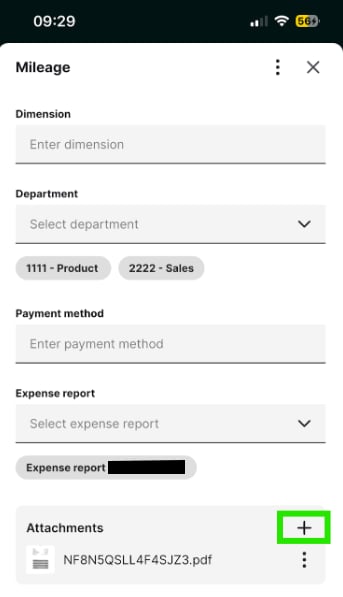
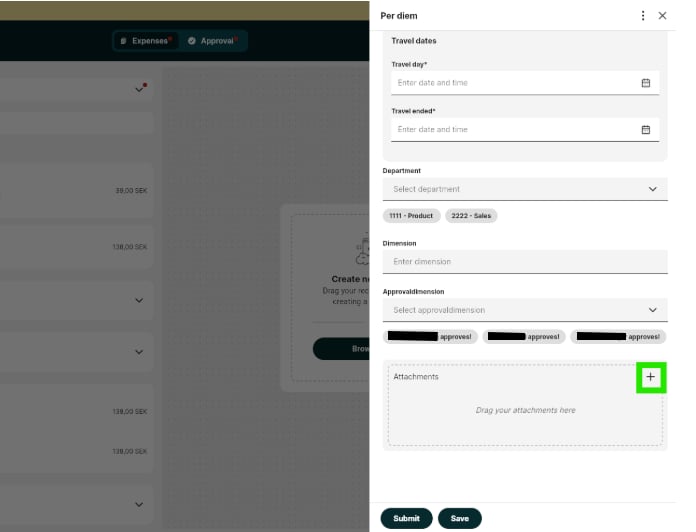
* **Upload:** Similar to a standard reciept expense, “Attatchments +” button allows the user to select a file or take a photo of a physical attachment (e.g. boarding pass)
*Mobile app*
 *Web interface*
 * **Aggregation:** For Mileage, a user can enter a total kilometer amount and attach a single specification file (e.g., a monthly log) rather than creating dozens of individual entries.
* **Submission:** The Mileage och Per Diem is submitted with the attachment linked.
### For the administrator
* Administrators can preview, remove and add attachments for Mileage and Per diem in the admin view.
* When the report is generated, the attachment is automatically appended or linked within the exported PDF for the admin, which is included in the report integrations.
## Related articles
* [How do we set up per diem?](/en/settings-administrator/how-do-we-set-up-per-diem)
* [Can I add a taxable part per day (in addition to non-taxable part) for per diem?](/en/settings-administrator/can-i-add-a-taxable-part-per-day-in-addition-to-non-taxable-part-for-per-diem)
* **Aggregation:** For Mileage, a user can enter a total kilometer amount and attach a single specification file (e.g., a monthly log) rather than creating dozens of individual entries.
* **Submission:** The Mileage och Per Diem is submitted with the attachment linked.
### For the administrator
* Administrators can preview, remove and add attachments for Mileage and Per diem in the admin view.
* When the report is generated, the attachment is automatically appended or linked within the exported PDF for the admin, which is included in the report integrations.
## Related articles
* [How do we set up per diem?](/en/settings-administrator/how-do-we-set-up-per-diem)
* [Can I add a taxable part per day (in addition to non-taxable part) for per diem?](/en/settings-administrator/can-i-add-a-taxable-part-per-day-in-addition-to-non-taxable-part-for-per-diem)