> ## Documentation Index
> Fetch the complete documentation index at: https://help.findity.com/llms.txt
> Use this file to discover all available pages before exploring further.
# How can I see which approver has the report for approval?
export const InlineButton = ({href, children}) => {
const isExternal = (/^https?:\/\//).test(href || "");
return
{children}
;
};
**This article applies to the following countries**
* All countries
This article is for organisations with several approver chains, and when the administrator wants to see which approver has the report for approval.
Go to the tab *Settings - Reports - For approval*. Click on the three dots on the right side of the page and choose to click on *Approval status*.
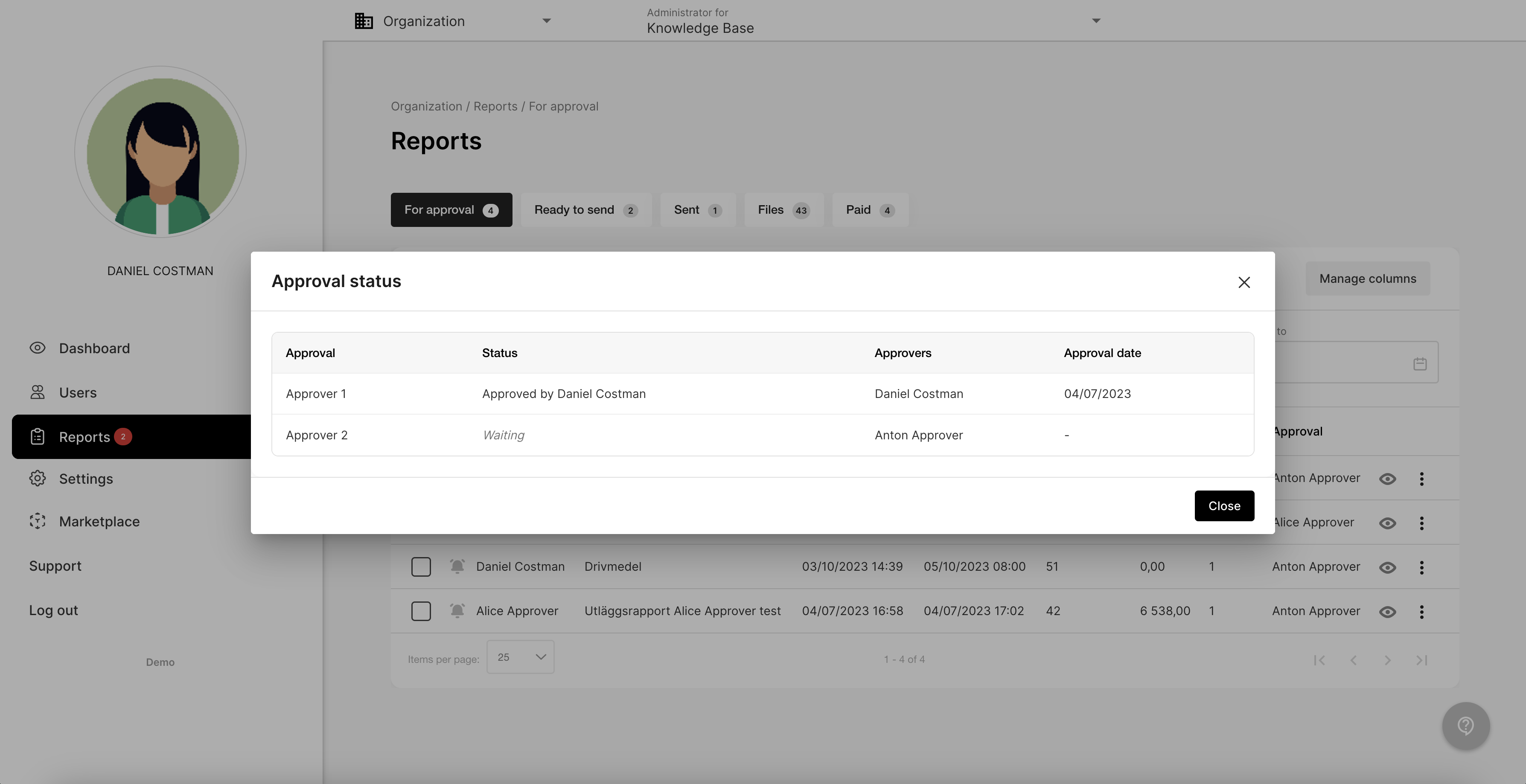
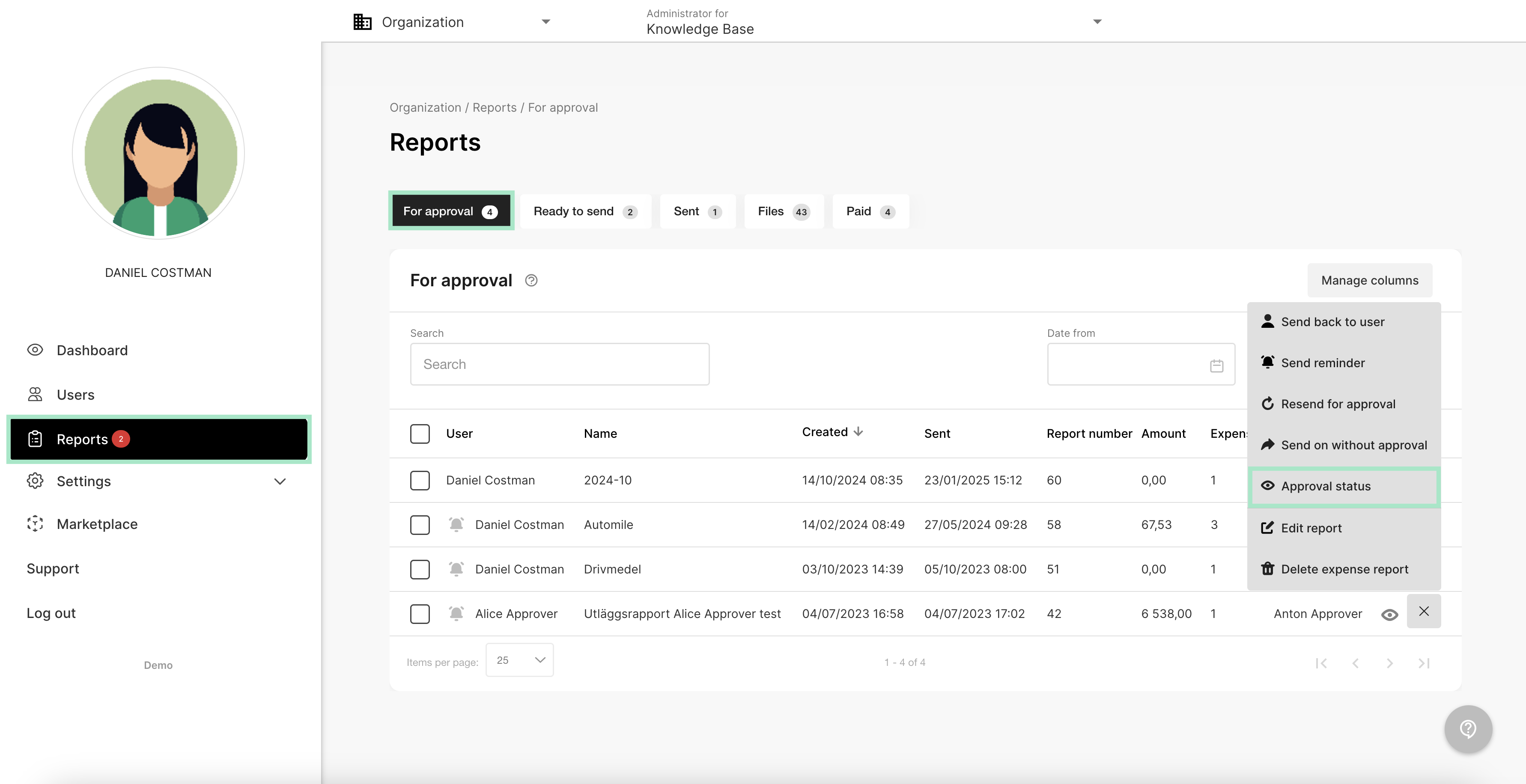 A new box will pop-up with *Approval status*.
In this example we can see that Approver 1 has approved 2023-07-04.
Approver 2 has not approved yet. The status is *waiting*.
A new box will pop-up with *Approval status*.
In this example we can see that Approver 1 has approved 2023-07-04.
Approver 2 has not approved yet. The status is *waiting*.
 Read more about how to set up approvers on the organisation here:
Settings for approval
## Related articles
* [Will the system know if the same expense were registered more than once?](/en/expense-and-reports-administrator/will-the-system-know-if-the-same-expense-were-registered-more-than-once)
* [How can I get a reminder when there is reports to handle?](/en/expense-and-reports-administrator/how-can-i-get-a-reminder-when-there-is-reports-to-handle)
* [Can I add a setting with how many expenses the user can register in a report?](/en/expense-and-reports-administrator/can-i-add-a-setting-with-how-many-expenses-the-user-can-register-in-a-report)
* [How can I as an administrator change the currency or the exchange rate in a submitted report?](/en/expense-and-reports-administrator/how-can-i-as-an-administrator-change-the-currency-or-the-exchange-rate-in-a-submitted-report)
* [Where do I add my e-mail as a recipient when reports is available to be handled at the organisation?](/en/expense-and-reports-administrator/where-do-i-add-my-e-mail-as-a-recipient-when-reports-is-available-to-be-handled-at-the-organisation)
Read more about how to set up approvers on the organisation here:
Settings for approval
## Related articles
* [Will the system know if the same expense were registered more than once?](/en/expense-and-reports-administrator/will-the-system-know-if-the-same-expense-were-registered-more-than-once)
* [How can I get a reminder when there is reports to handle?](/en/expense-and-reports-administrator/how-can-i-get-a-reminder-when-there-is-reports-to-handle)
* [Can I add a setting with how many expenses the user can register in a report?](/en/expense-and-reports-administrator/can-i-add-a-setting-with-how-many-expenses-the-user-can-register-in-a-report)
* [How can I as an administrator change the currency or the exchange rate in a submitted report?](/en/expense-and-reports-administrator/how-can-i-as-an-administrator-change-the-currency-or-the-exchange-rate-in-a-submitted-report)
* [Where do I add my e-mail as a recipient when reports is available to be handled at the organisation?](/en/expense-and-reports-administrator/where-do-i-add-my-e-mail-as-a-recipient-when-reports-is-available-to-be-handled-at-the-organisation)