> ## Documentation Index
> Fetch the complete documentation index at: https://help.findity.com/llms.txt
> Use this file to discover all available pages before exploring further.
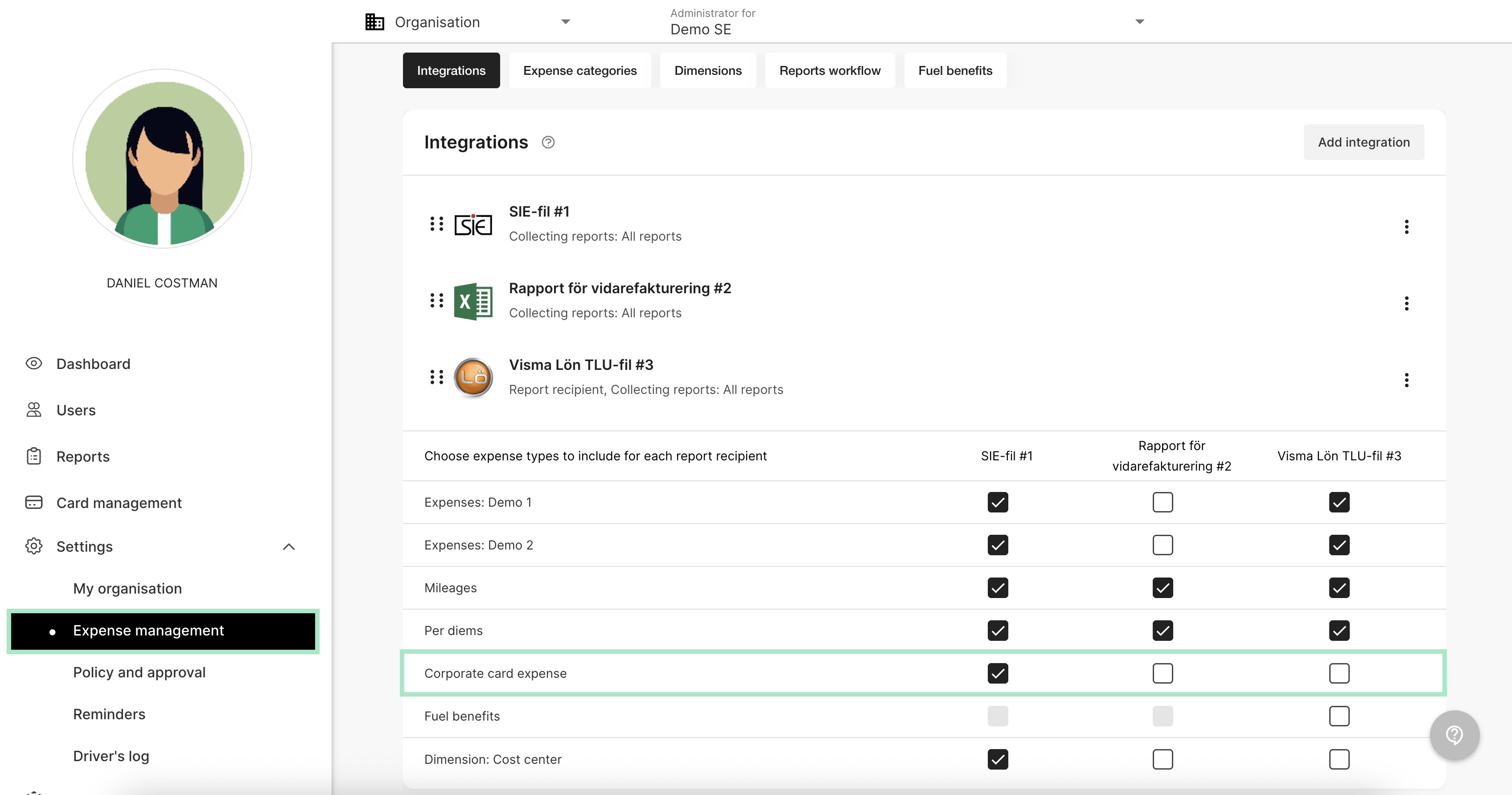
# Corporate card reports should only be sent to the accounting recipient. How do I add that setting?
**This applies to the following countries**
* All countries
Go to the tab *Settings - Expense management - Integrations*. Choose where to send corporate card reports by checking the box. In this example we have chosen corporate card reports to be sent to the integration SIE-file.
 ## Related articles
* [How do I cancel the connection to corporate cards on the organisation?](/en/corporate-cards-administrator/how-do-i-cancel-the-connection-to-corporate-cards-on-the-organisation)
* [What does the tab corporate card under reports mean?](/en/corporate-cards-administrator/what-does-the-tab-corporate-card-under-reports-mean)
* [Activate corporate cards on our organisation and add cardholders](/en/corporate-cards-administrator/activate-corporate-cards-on-our-organisation-and-add-cardholders)
* [Activating bank integration (Nordea First Card Real Time)](/en/corporate-cards-administrator/activating-bank-integration-nordea-first-card-real-time)
* [Can a user have more than one connected corporate card?](/en/corporate-cards-administrator/can-a-user-have-more-than-one-connected-corporate-card)
## Related articles
* [How do I cancel the connection to corporate cards on the organisation?](/en/corporate-cards-administrator/how-do-i-cancel-the-connection-to-corporate-cards-on-the-organisation)
* [What does the tab corporate card under reports mean?](/en/corporate-cards-administrator/what-does-the-tab-corporate-card-under-reports-mean)
* [Activate corporate cards on our organisation and add cardholders](/en/corporate-cards-administrator/activate-corporate-cards-on-our-organisation-and-add-cardholders)
* [Activating bank integration (Nordea First Card Real Time)](/en/corporate-cards-administrator/activating-bank-integration-nordea-first-card-real-time)
* [Can a user have more than one connected corporate card?](/en/corporate-cards-administrator/can-a-user-have-more-than-one-connected-corporate-card)